Being the parent of a 3-year-old I can't count the number of times I've watched this music video (which I've actually grown quite fond of):
Jack's Big Music Show | I Hog The Ground - Music Video | Nick Jr.
I also can't count the number of episodes of Blue's Clues I watched. However, I completely failed to put 2+2 together. It's Steve from Blues Clues! Oh yeah... and the other guy is from The Flaming Lips!
Go figure.
Sunday, July 03, 2011


Thursday, May 26, 2011
Ooma Refer-A-Friend program
If you are reading this, you probably know me personally... and you probably know that I switched to a VOIP provider, Ooma, about a year ago. Which gives me unlimited local and long distance calling and in my case, no monthly fees. Unfortunately, the newer ooma hardware does have some small service fees (more in a minute), but they are still nominal.
Needless to say, I'm completely happy with it as a product. The only problems I have are when my Internet service goes down. Ooma itself has been completely reliable over the last year.
I like the idea of having a "home" phone separate from my cell phone and I hate giving out my personal cell numbers to Businesses (for fear of getting on cold call lists). In fairness, Google Voice has mitigated this somewhat, but my wife is also much more comfortable having a phone. On top of that... I have managed to work from home on occasion over the last year... and I don't think my Android phone batter could have handled the 6+ hours of conference calls I was incurring on a regular basis.
Ooma rocks.
Like last year, they are running a Refer-A-Friend promotion during the month of May. Yes, that means if you are interested you have less then a week to make up your mind. That being said, because with Ooma you buy the hardware... (and at least for the first) don't pay any service fees (after the first year, Ooma Telo users will have to pay Taxes... which is on the order of about $12 per year).... you can buy the hardware, install it... try it out and if you don't like it... you can return it and only be out the return shipping costs. It's in this fine print that nobody ever reads.
So, I have codes I can give away, and in the interest of full disclosure... I get an amazon gift card out of the deal... but you can save $50 on the Ooma Telo unit. Codes are one-time use only so first come, first served. The links will take you to a page where you can order them, and the actually code should be pre-populated in the text box, but if not, cut-n paste the below:
Yes, if you are friends on facebook, you've been seeing this stuff about once a week. Sorry, I'm trying to not overdue it, but not everyone checks facebook all the time and stuff "falls off"... so I've reposted it a few times.
If you have any questions, feel free to ask me. If nothing else, you can use the link on the right to get my email address.
Needless to say, I'm completely happy with it as a product. The only problems I have are when my Internet service goes down. Ooma itself has been completely reliable over the last year.
I like the idea of having a "home" phone separate from my cell phone and I hate giving out my personal cell numbers to Businesses (for fear of getting on cold call lists). In fairness, Google Voice has mitigated this somewhat, but my wife is also much more comfortable having a phone. On top of that... I have managed to work from home on occasion over the last year... and I don't think my Android phone batter could have handled the 6+ hours of conference calls I was incurring on a regular basis.
Ooma rocks.
Like last year, they are running a Refer-A-Friend promotion during the month of May. Yes, that means if you are interested you have less then a week to make up your mind. That being said, because with Ooma you buy the hardware... (and at least for the first) don't pay any service fees (after the first year, Ooma Telo users will have to pay Taxes... which is on the order of about $12 per year).... you can buy the hardware, install it... try it out and if you don't like it... you can return it and only be out the return shipping costs. It's in this fine print that nobody ever reads.
So, I have codes I can give away, and in the interest of full disclosure... I get an amazon gift card out of the deal... but you can save $50 on the Ooma Telo unit. Codes are one-time use only so first come, first served. The links will take you to a page where you can order them, and the actually code should be pre-populated in the text box, but if not, cut-n paste the below:
Yes, if you are friends on facebook, you've been seeing this stuff about once a week. Sorry, I'm trying to not overdue it, but not everyone checks facebook all the time and stuff "falls off"... so I've reposted it a few times.
If you have any questions, feel free to ask me. If nothing else, you can use the link on the right to get my email address.
Saturday, May 21, 2011
A Nook Color Update
I recently opted to move from my "stock" rooted Nook Color to an install of Cyanogenmod7 running entirely off an SD card. This will allow me to restore Barnes and Noble's stock OS to the nook's internal storage and I get my custom environment just by inserting my special SD card... or I can remove it, reboot and return to stock.
That said, CM7 has been really nice. From what I can tell, the only thing I loose is the ability to view "Children's" books on the Nook Color as they aren't supported by the Nook app that's available from the Android Market. Everything else appears to work great.
Installing to SD card requires a card that's very good at small block random I/O. It turns out that counter-intuitive most "high speed" MicroSD cards are actually quite poor at small block random IO. Also, for some reason, Sandisk appears to be the reigning "speed king". For some reason, generally speaking, Sandisk Class 2 and Class 4 cards have generally been found to be the best option. For more information, there's quite a bit of discussion on this thread on xda.
If you were interested in doing this same kind of install, I would recommend checking out this very good guide here.
It turns out that my Nook Color is actually "faster" running CM7 off of SD then it was running B&N's kernel off of the Nook's internal memory. This isn't just my perception... I have benchmarks to back it up. The first two screenshots featured in this article show my benchmarking results I was seeing running a rooted version of B&N's 1.1 release. Whereas the latter two screenshots show the new results now that I'm running CM7 from an SD card. (Clicking on the images will take you to larger version).
Bare in mind, I have not installed an "overclocked" kernel at this point. My understanding is that it's quite possible to get another 30% boost in performance from overclock and the Nook Color will still be quite stable. The huge increase in linpack scores and Quadrant "CPU" numbers can largely be attributed to the much improved JNI capabilities found in the Android 2.3 (Gingerbread) kernel used by CM7 and the much older Android 2.1 (Eclair) kernel that B&N had supplied with my nook. (In fairness to B&N I've not tried their latest Nook Color OS which is Android 2.2 (Froyo)-based which should see most of those same performance improvements.)
Lastly, now that I'm on CM7, I thought I would install the newly released Netflix for Android app. I'm happy to report that it works quite well. I was able to install netflix by mostly following the instructions documented in this reddit post.
However, it turns out that for SD installs, ES File explorer can't mount the /system file system in read/write mode so you can't edit the build.prop file at all. However, if you open the Terminal Emulator and enter the following commands you can do it yourself:
Afterwards most users were then able to use ES File Explorer to perform the necessary edits to build.prop. I opted to use the "Nexus S" variant.
In my case, however... I couldn't get ES File Explorer to work at all. Every time I attempted to edit the file after remounting the filesystem produced an error. However, I realized that the CM7 install includes a copy of the venerable vi editor and the stock Terminal Emulator works well enough to use it. The only catch, as fellow vi users well know... how in the world do you send an "Esc" key from an android virtual keyboard (to exit edit mode and return to command mode). It turns out that the stock Terminal Emulator will send an "Esc" if you hold volume down on the nook and then press a "1" on the virtual keyboard!
All in all, I'm really happy with this install.
Here's a quick video showing Netflix running on the Nook Color:
That said, CM7 has been really nice. From what I can tell, the only thing I loose is the ability to view "Children's" books on the Nook Color as they aren't supported by the Nook app that's available from the Android Market. Everything else appears to work great.
Installing to SD card requires a card that's very good at small block random I/O. It turns out that counter-intuitive most "high speed" MicroSD cards are actually quite poor at small block random IO. Also, for some reason, Sandisk appears to be the reigning "speed king". For some reason, generally speaking, Sandisk Class 2 and Class 4 cards have generally been found to be the best option. For more information, there's quite a bit of discussion on this thread on xda.
If you were interested in doing this same kind of install, I would recommend checking out this very good guide here.


It turns out that my Nook Color is actually "faster" running CM7 off of SD then it was running B&N's kernel off of the Nook's internal memory. This isn't just my perception... I have benchmarks to back it up. The first two screenshots featured in this article show my benchmarking results I was seeing running a rooted version of B&N's 1.1 release. Whereas the latter two screenshots show the new results now that I'm running CM7 from an SD card. (Clicking on the images will take you to larger version).
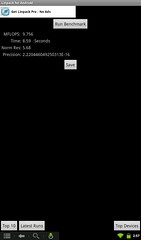
Bare in mind, I have not installed an "overclocked" kernel at this point. My understanding is that it's quite possible to get another 30% boost in performance from overclock and the Nook Color will still be quite stable. The huge increase in linpack scores and Quadrant "CPU" numbers can largely be attributed to the much improved JNI capabilities found in the Android 2.3 (Gingerbread) kernel used by CM7 and the much older Android 2.1 (Eclair) kernel that B&N had supplied with my nook. (In fairness to B&N I've not tried their latest Nook Color OS which is Android 2.2 (Froyo)-based which should see most of those same performance improvements.)
Lastly, now that I'm on CM7, I thought I would install the newly released Netflix for Android app. I'm happy to report that it works quite well. I was able to install netflix by mostly following the instructions documented in this reddit post.
However, it turns out that for SD installs, ES File explorer can't mount the /system file system in read/write mode so you can't edit the build.prop file at all. However, if you open the Terminal Emulator and enter the following commands you can do it yourself:
su
busybox mount -o remount,rw /system
Afterwards most users were then able to use ES File Explorer to perform the necessary edits to build.prop. I opted to use the "Nexus S" variant.
In my case, however... I couldn't get ES File Explorer to work at all. Every time I attempted to edit the file after remounting the filesystem produced an error. However, I realized that the CM7 install includes a copy of the venerable vi editor and the stock Terminal Emulator works well enough to use it. The only catch, as fellow vi users well know... how in the world do you send an "Esc" key from an android virtual keyboard (to exit edit mode and return to command mode). It turns out that the stock Terminal Emulator will send an "Esc" if you hold volume down on the nook and then press a "1" on the virtual keyboard!
All in all, I'm really happy with this install.
Here's a quick video showing Netflix running on the Nook Color:
Thursday, March 10, 2011
Video of a Rooted Nook Color
I got some questions from a few friends about yesterday's post and so I thought before I put my blog back into hibernation for another year I would go ahead and shoot some video of my nook color.
Again, as I state in the video... I didn't do anything new or original here. Just followed some instructions that others have written out. For the technical details, I'm still running the stock nook kernel which, I believe, is Android 2.1.
Again, as I state in the video... I didn't do anything new or original here. Just followed some instructions that others have written out. For the technical details, I'm still running the stock nook kernel which, I believe, is Android 2.1.
Wednesday, March 09, 2011
Of ebooks and such...
My brother recently emailed me asking my opinions on the nook versus the kindle. My wife and I purchased a nook around Thanksgiving this year and so I'm probably not the least biased source around, but I have a lot of thoughts on the topic and I realized that my email to him would make for a pretty good blog post.
We bought our first nook (the original, non-color variety) because:
- It was on sale for $99 which made it about $40 cheaper then the kindle and...
- The nook supports ePUB files which is an industry standard ebook format and one which is available from public libraries. Yes, you can digitally "check out" books from a library download it and put it on your reader. Here's a site to see if your library system supports digital lending.
Sony's eReaders and the nook both support EPUB files... kindle does not. This has been one of the biggest criticisms of the kindle and amazon has not responded to it. Most people feel that amazon won't ever address this because they want to make their users buy books only from them... and since they are #1 in the ebook market they feel that they can get away with it. nook and Sony have to be more competitive.
Finally, after buying the nook... google launched their own ebook store... and since it uses ePUB... that's right you can buy books from them, download them and read them on the nook. No kindle support (although google indicates they are trying to find a way to support the kindle). If you want to check out google's ebook store you can click here. Notice that the nook is listed on their list of supported devices on the top of the page.
So... if google selling the book for less... we can buy it somewhere else.
Something else to bare in mind with both nook and kindle... if you buys books digitally from B&N and amazon (respectively) their ebook systems allow you to download your books to any devices that's connected to the same account. So my wife and I have one B&N account and we can download the same books to our nook and our android phones (with the nook app). If you are reading a book... the account keeps track of where you are... so if you can put down one device and open the book up in another device and keep reading. While reading on a 4" phone screen isn't as good as the 7" nook screen.... it means if we're stuck waiting in line someplace and we only have our phone on us... we can still read. Pretty nice deal. Sony doesn't appear to have an answer to that.
However, if you buy books outside of B&N and you install them by loading files manually onto the devices... you lose the ability to read on multiple devices (unless you manually load the book onto each device) and the service will not be able to keep track of which page you are on. Those features only worth with books purchased from B&N's online store (or for kindle owner's, amazon's ebookstore). That said, I think these features are great to have, and more than likely if you own a nook (or kindle)... most of your book purchases would probably come from the devices main store so you'll only lose this with the occasionally book bought from google or from ePUB files digitally checked out from the library.
We are so enamored with our nook when B&N ran a promotion last week on the nook color for $200... I jumped on it. Well, that and they are quite hackable into full blown android tablets... and no other android tablet comes close to $200.
Arstechnica even ran a recent article on how to hack the nook color. (One should be warned that this does void your warranty... personally, I think this is worth the risk, but obviously this isn't for everyone). I've only had the nook color for two days (as of this writing) and I spent yesterday hacking mine. I've even already got Angry Birds running on it.
For those curious about hacking a nook color... you do not necessarily lose the the apps that shipped on it (such as the B&N ereader app)... and since it's using the same B&N account that we were using with the older nook... I can pull up the same books on it too. Lastly, Google's android marketplace works very similiar to how both B&N and amazon run their ebook stores. Once you buy an app for android it works on any device that is registered against the same account... so all of the commercial apps I've purchased for my phone can now also be downloaded to the nook color . That being said, not every app will work on the nook color.
For those feeling particularly vengeful against B&N (or those that already have a kindle and a bunch of amazon ebooks)... once you hack the nook color you can actually put the kindle app on it and use it to buy amazon books if you really want to. For me, I'll stick to B&N's book so I can still read them on the old nook too.
So all in all.. I think nook is the way to go. While I really like the nook color, I think, for the price, the extra battery life, and e-ink screen (no color, but really easy on the eyes) it's best start with a plain 'ole nook and then, like I did, you can add a nook color to your account later for reading in the dark, digital magazines, childrens books or maybe even as an android tablet, if you feel so inclined.
That being said I'll offer one caveat with regard to ebooks, in general. Amazon is clearly king of the hill in the ereader market and the iPad is now number two. It's quite possible that Barnes and Noble will eventually get out of this business... and while you could still use it for ePub files... it's not clear what will happened to the DRM content you bought... can you still read those books if B&N's online store goes away? This is a fundamental problem with ebooks (and any DRM content)... so technically it could happen with amazon too, but I'm going to bet that amazon will last longer then B&N.... so the nook is technically riskier because of that... but I think it's still worth the risk.
I'll close with one last, shameless shill. B&N has a referral program and is offering me a discount on any referrals... so for anyone reading this that feels so compelled to run out and buy one... feel free to use my referal link... I can get some ebook credit for it. Thanks.
Tuesday, January 25, 2011
I have a blog?
Oh yeah.... forgot.
View Houston Dynamo Stadium Site in a larger map
Actually the reason for this post. I actually got mentioned in another blog!
I made the below map and submitted to Houston Strategies. Click the link to check out the mention.
Here's an embeddable version of the same map.
View Houston Dynamo Stadium Site in a larger map
What's the point? With several already existing multi-block properties on the east side of downtown, it's pretty difficult for cross town traffic to move between downtown and the areas immediately east of downtown. Well, it's about to get worse because Houston's MLS team (the dynamo) are about to construct a stadium and block even more streets.
Monday, February 08, 2010
Not a professional job, but...
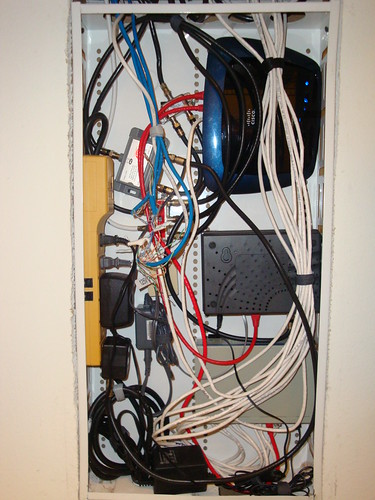
My structured wiring panel has been a mess for years. In fact, it was never really in that good of shape. I think a lot of the problem stems from not having components that are designed to be mounted in the box. Up until now everything wold basically "hang loose", but I broke down this weekend and bought some Velcro with sticky backing. I then mounted everything to the box. You'll find (counter-clockwise from bottom right):
- 16 port 10/100 switch
- Comcast VOIP cable modem
- Linksys WRT610N Wireless router
- 2-way cable splitter. One leg goes to the cable modem the other to an amplifier.
- Cable amplifier
- Surge protector (powered by outlet in the bottom of the box)
- Four-way cable splitter. (Fed from amplifier, all four legs running up through the top of the box and out to the various rooms of the house.)
Could really use to get a punch-down block for the telephone lines. You can actually see the telephone wires as the blue wires on the left in front of the cable equipment. Today they jut twisted together. I'm conflicted about spending money on a punch-down block because I've already disconnected my POTS service and I'm contemplating cancelling VOIP service. At that point the phone lines are just going to be dead.
The Wireless router is actually not mounted in the box at this point. The tension of the various wires around it hold it in place. It's somewhat surprising that I can get a good wireless signal with the router and its antenna completely enclosed in this metal box, but it seams to work okay.
BONUS credit if you noticed that one of the CAT 5e cables are not running into the 16-port switch, but rather is plugged directly into the WRT610N. This is because this one wire is connected to my NAS. Since the WRT610N and the NAS both support gigabit we actually should get a bit better throughput to the NAS for the 802.11N network. (Well, in theory anyway).
Subscribe to:
Posts (Atom)

 Posts
Posts


